Tackling High Metric Cardinality in Prometheus and VictoriaMetrics
What happens to a TSDB when UUIDs, IP addresses, or user emails end up in metric labels. A complete guide to detecting, isolating, and filtering anomalous cardinality.
Christian Lindqvist
Principal Infrastructure Engineer & SRE Architect
Christian Lindqvist is a veteran systems architect and SRE Consultant. He specializes in distributed tracing, TSDB scaling, high-performance Linux kernel tuning, and cloud-native container orchestrations.
One of the most common reasons why monitoring servers (Prometheus, VictoriaMetrics, Grafana Mimir) crash with OOM (Out Of Memory) errors is high cardinality. This refers to a scenario where one or more metrics contain labels with too many unique values, or when these values change at a very high rate (known as Label Churn Rate).
In this article, we’ll dive deep into the inner workings of a Time Series Database (TSDB), explain why highly unique labels drain memory, show you how to find problematic metrics using built-in tools, and provide ready-made strategies to protect your monitoring infrastructure.
1. How TSDB Indexing Works and Why Cardinality Matters
In Prometheus, a time series is defined by a unique combination of a metric name and a set of key-value labels.
For example:
http_requests_total{method="POST", status="200"}is one unique time series.http_requests_total{method="GET", status="200"}is a second unique time series.
To query data rapidly, Prometheus utilizes an inverted index, similar to those used in search engines like Elasticsearch. This index maps each label name and value to a list of Time Series IDs where they appear.
This index is stored entirely in RAM in the Head Block (the TSDB’s memory buffer) to ensure ultra-fast read and write operations.
What Happens When You Add a Unique Label?
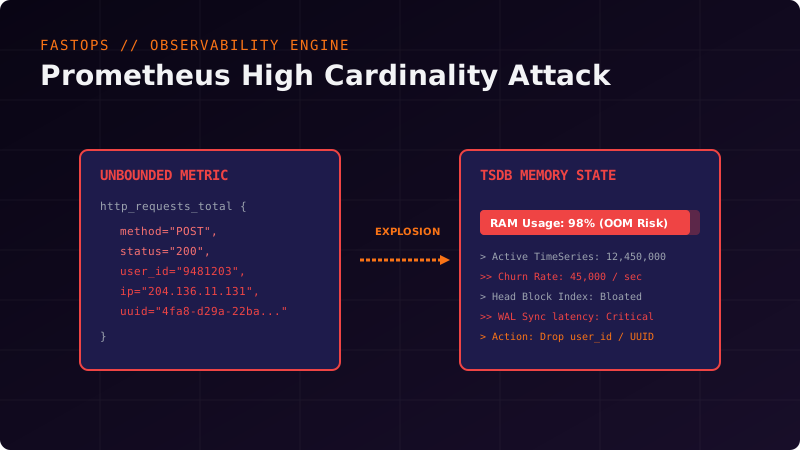
Imagine a developer decides to track individual user IDs or client IP addresses in request metrics:
http_requests_total{method="POST", status="200", user_id="8491024", client_ip="203.0.113.45"}If your application serves 1,000,000 unique users per day, this immediately generates 1,000,000 unique time series.
For the TSDB, this means:
- Index Bloat: A million new unique keys are written to the inverted index. The memory required to hold this index structure begins to grow exponentially.
- Label Churn Rate (Time Series Leakage): Most users visit once and never return. The time series is created, records a single data point, and goes “cold” (becomes inactive). However, it continues to consume space in the Head Block’s RAM for at least two hours (until the block is rotated to disk).
- Garbage Collection (GC) Slowdown: The Go garbage collector is forced to traverse a massive tree of objects in memory, leading to GC pauses and high CPU overhead.
- OOM Crashes: RAM limits are exhausted, and the operating system’s OOM Killer abruptly terminates the Prometheus process.
2. Pinpointing the Source of High Cardinality
If you notice that Prometheus has started consuming an abnormal amount of RAM, your first step is to locate the root cause.
Method 1: Using the Prometheus TSDB Status API
Prometheus provides a powerful statistics page directly in its web UI at /status (under the TSDB Status section). If you only have API access, you can run a curl request:
curl -G -s http://localhost:9090/api/v1/status/tsdb | jq '.data'This request returns structured JSON with detailed statistics on your Head Block:
numberOfSeries: The total number of active time series in memory.topLabelNames: Labels with the highest count of unique values.seriesCountByMetricName: The top 10 metrics generating the most time series.
Example of critical output:
{
  "seriesCountByMetricName": [
    { "name": "http_requests_total", "value": 8450122 },
    { "name": "jvm_memory_bytes_used", "value": 124050 }
  ],
  "labelValueCountByLabelName": [
    { "name": "user_id", "value": 8410214 },
    { "name": "instance", "value": 42 }
  ]
}
Here, the culprit is obvious: http_requests_total has ballooned to 8.4 million series because of the user_id label.
Method 2: Evaluating Cardinality with PromQL
If Prometheus is still up and responsive to queries, you can use specialized queries to assess time series creation dynamics.
Calculating the number of unique time series per metric:
count by (__name__) ({__name__=~".+"})To find the metrics with the highest churn rate (series creation rate) over the last 5 minutes:
sum by (__name__) (rate(prometheus_tsdb_head_series_created_total[5m]))3. Mitigation and Filtering Strategies
What can you do if you encounter a cardinality issue in production and developers cannot instantly deploy a code fix?
Solution 1: Stripping Unwanted Labels via Relabeling in Prometheus
You can configure metric relabeling rules directly in your prometheus.yml configuration file. This allows you to “cut out” dangerous labels during the scraping phase before they are written to the database.
Example configuration:
scrape_configs:
  - job_name: 'backend-services'
    kubernetes_sd_configs:
      - role: pod
    relabel_configs:
      # Filter Kubernetes metadata...
    metric_relabel_configs:
      # Strip user_id and client_ip labels from http_requests_total
      - source_labels: [__name__, user_id]
        regex: "http_requests_total;(.+)"
        target_label: user_id
        replacement: "redacted" # replace the real value with static text

      - source_labels: [__name__, client_ip]
        regex: "http_requests_total;(.+)"
        target_label: client_ip
        replacement: "redacted"
After applying this rule, all 1,000,000 series will merge into a single series with the label user_id="redacted", instantly relieving memory pressure.
Solution 2: Relabeling in VictoriaMetrics
If you use VictoriaMetrics for storage, it has a built-in mechanism for global relabeling via vmselect / vminsert startup flags or the -relabelConfig rules file.
Example VictoriaMetrics rule file relabel.yml:
- action: labeldrop
  regex: "user_id|client_ip|uuid|session_token"
Running VictoriaMetrics with this rule file completely drops these labels from all metrics globally.
Solution 3: Limiting Cardinality at the Scraping Level (Scrape Limits)
You can protect your monitoring server from accidental cardinality “explosions” caused by new microservices by setting strict limits on the number of series a single target can expose.
In prometheus.yml:
scrape_configs:
  - job_name: 'untrusted-app'
    static_configs:
      - targets: ['untrusted-service:8080']
    sample_limit: 5000 # IF THE SERVICE EXPOSES MORE THAN 5000 METRICS, THE SCRAPE WILL FAIL
In VictoriaMetrics, this is achieved using the -maxMetricsPerScrape flag.
4. Best Practices for Designing Metrics
To avoid fighting fires in production, establish these telemetry design guidelines for your development team:
- Metrics are not logs. Never store dynamic user details, session tokens, or raw URLs (if they contain resource IDs, e.g.,
/api/v1/users/123/profile) inside labels. - Normalize request paths. Instead of saving the full URL, use route templates:
/api/v1/users/:id/profile. - Be careful with Histogram Buckets. Histograms (
prometheus_client_histogram) create a copy of the time series for each bucket (le="0.1",le="0.5", etc.). Multiplying histogram buckets by other high-cardinality labels triggers exponential cardinality growth. - Use APM / Tracing for granular analysis. If you absolutely need to know which specific user experienced request latency, use distributed tracing (OpenTelemetry + Jaeger) or centralized logging (Grafana Loki, VictoriaLogs) rather than TSDB metrics.
Conclusion
High cardinality is the natural trade-off for the flexibility of multi-dimensional databases. By understanding how the Prometheus index works, monitoring time series creation (Label Churn) in a timely manner, and properly configuring metric_relabel_configs, you can keep your monitoring infrastructure stable even during explosive business growth.
Read more tech career (DevOps/SRE) guides on the FastOps blog.
Related Posts
Scaling Prometheus for High-Throughput Metrics with Thanos
An architectural analysis of federated monitoring, object storage backends, downsampling heuristics, and historical metric queries at scale.
Designing for SRE: Building Ultra-Reliable Infrastructure
Practical steps to minimize MTTR, calculate Error Budgets, and implement self-healing server architectures.
Debugging Distributed Applications in Kubernetes via Ephemeral Containers
A deep technical guide to using Ephemeral Containers to debug distroless and scratch images in production without restarting pods.
On this page
Category
sre-guidesRelated Posts
Scaling Prometheus for High-Throughput Metrics with Thanos
An architectural analysis of federated monitoring, object storage backends, downsampling heuristics, and historical metric queries at scale.
Designing for SRE: Building Ultra-Reliable Infrastructure
Practical steps to minimize MTTR, calculate Error Budgets, and implement self-healing server architectures.
Debugging Distributed Applications in Kubernetes via Ephemeral Containers
A deep technical guide to using Ephemeral Containers to debug distroless and scratch images in production without restarting pods.