Debugging Distributed Applications in Kubernetes via Ephemeral Containers
A deep technical guide to using Ephemeral Containers to debug distroless and scratch images in production without restarting pods.
Christian Lindqvist
Principal Infrastructure Engineer & SRE Architect
Christian Lindqvist is a veteran systems architect and SRE Consultant. He specializes in distributed tracing, TSDB scaling, high-performance Linux kernel tuning, and cloud-native container orchestrations.
In modern DevOps and SRE practices, using minimalist base container images—such as Google’s Distroless or completely empty scratch images—has become the standard for security and performance. These images lack command shells (bash, sh), system package managers (apt, apk), debugging utilities (curl, wget, tcpdump, strace), and even basic utilities like ls or cat.
From a security hardening perspective, this is an ideal solution: an attacker who gains access to a container via RCE (Remote Code Execution) cannot easily escalate the attack because they have no system exploration tools. But for an SRE engineer trying to isolate a complex production issue (such as a file descriptor leak, a thread hang, or anomalous network behavior), this turns into a nightmare. Connecting via kubectl exec is impossible—the system returns an error:
OCI runtime exec failed: exec failed: unable to start container process: exec: "bash": executable file not found in $PATH: unknownHistorically, engineers had to either rebuild the image with debugging utilities and restart the pod (which erases the reproducible failure state) or use dirty hacks at the host Node level.
The solution to this problem is the Ephemeral Containers mechanism, which entered stable release in Kubernetes 1.25+. In this article, we will break down in detail how this mechanism works, how to configure process namespace sharing, and how to perform deep debugging of distributed systems on the fly.
1. What Are Ephemeral Containers?
An Ephemeral Container is a special type of container that is launched inside an already existing pod (Pod) to perform temporary tasks such as troubleshooting and administration.
The main differences between ephemeral containers and regular ones are:
- Dynamic Addition: You cannot add an ephemeral container when creating a pod via a
DeploymentorStatefulSetmanifest. They are added exclusively to a running pod via a special API endpoint:subresource/ephemeralcontainers. - No Resource Guarantees: Ephemeral containers have no guaranteed resources (resource limits/requests) and do not affect pod scheduling.
- Immutable Lifecycle: They do not restart automatically upon failure and do not guarantee long-term operation.
2. Enabling PID Namespace Sharing
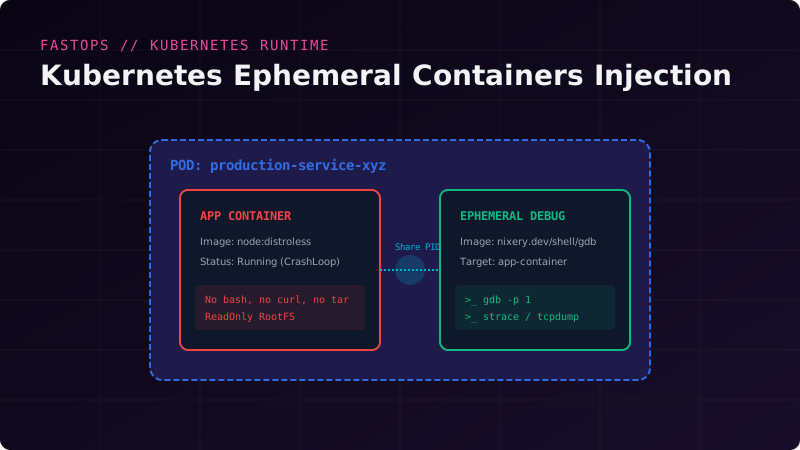
In order for a debugging container to inspect the processes of the target container, they must share the same process namespace (PID Namespace Sharing). By default, each container in a pod in Kubernetes has an isolated PID list.
For deep debugging capabilities (e.g., using strace -p <PID> or gdb), your pod manifest or Deployment template must explicitly enable the shareProcessNamespace: true field:
apiVersion: apps/v1
kind: Deployment
metadata:
  name: production-service
  namespace: billing
spec:
  replicas: 3
  selector:
    matchLabels:
      app: billing-app
  template:
    metadata:
      labels:
        app: billing-app
    spec:
      shareProcessNamespace: true # CRITICAL FOR PROCESS DEBUGGING
      containers:
      - name: app-container
        image: gcr.io/distroless/nodejs:18
        ports:
        - containerPort: 3000
When shareProcessNamespace is enabled:
- The target container’s processes are visible in all other containers within the pod.
- The process with PID 1 is no longer the main application process (the system init process
/pausebecomes PID 1). The application process will receive a random PID. - The containers’ filesystems are accessible to each other through the
/proc/<PID>/rootdirectory.
3. Practical Debugging with kubectl debug
The kubectl debug command abstracts the complex process of sending JSON requests to the Kubernetes API server, allowing you to launch a temporary container with a single line.
Scenario 1: Basic Shell Connection
Let’s launch a debugging container with the nenter/ubuntu image inside a troubled production-service-xyz pod:
kubectl debug -it production-service-xyz \
  --image=nixery.dev/shell/curl/ps/strace \
  --target=app-container \
  --namespace=billing
Breaking down the parameters:
-it: interactive mode with TTY allocation.--image: debugging container image. The example uses Nixery.dev—a service that dynamically builds a minimal image withcurl,ps, andstrace.--target: the name of the target container with which we want to share the process namespace (PID namespace). If this flag is omitted, we will not be able to trace application processes directly.
Scenario 2: Network Traffic Analysis (tcpdump)
If you need to capture a network dump (pcap) from a pod’s interface but the target container lacks the permissions and utilities:
kubectl debug -it production-service-xyz \
  --image=nixery.dev/shell/tcpdump \
  --target=app-container \
  -- tcpdump -i any -w - | wireshark -k -i -
This pipeline pipes the binary pcap data stream from the container directly to your local Wireshark for real-time visual analysis!
Scenario 3: Tracing System Calls (strace)
Suppose a Node.js application in a distroless container has hung and is consuming 100% CPU. We want to know what system calls it is making.
- Start the debugging session:
kubectl debug -it production-service-xyz --image=nixery.dev/shell/strace/ps --target=app-container - Inside the debugging container, find the application process PID:
Output:ps auxUSER PID %CPU %MEM VSZ RSS TTY STAT START TIME COMMAND root 1 0.0 0.0 1024 64 ? Ss 10:15 0:00 /pause root 7 0.0 1.2 820124 45120 ? Sl 10:15 0:05 node server.js root 24 0.0 0.0 5120 2412 pts/0 Ss 10:20 0:00 sh - Run tracing on the Node.js process (PID 7):
The utility will gather statistics on system calls and show on which calls (such asstrace -p 7 -cepoll_waitorfutex) the thread is blocking.
4. Permissions Configuration: RBAC and Security Profiles
Using ephemeral containers requires specific permissions in the Kubernetes RBAC model. If you are configuring access for support engineers, you need to grant them access to the pods/ephemeralcontainers subresource.
Example RBAC role for debugging:
apiVersion: rbac.authorization.k8s.io/v1
kind: Role
metadata:
  name: developer-debugger
  namespace: billing
rules:
- apiGroups: [""]
  resources: ["pods"]
  verbs: ["get", "list", "watch"]
- apiGroups: [""]
  resources: ["pods/ephemeralcontainers"]
  verbs: ["update", "patch"] # Required for injection
Gotcha: Pod Security Standards (PSS)
In clusters with strict security policies (e.g., the restricted profile), launching ephemeral containers with privileged rights (privileged: true or hostNetwork: true) will be blocked by the Admission Controller.
To bypass this, use debugging images that do not require root permissions, or configure exceptions in security profiles for specific debugging namespaces.
5. Alternative: Manual API Injection (Without kubectl CLI)
Sometimes you might not have access to a modern kubectl CLI, or you need to automate debugging from an external orchestrator. In this case, you can send a patch request to the Kubernetes API directly.
Create a temporary patch configuration file ephemeral-patch.json:
{
  "spec": {
    "ephemeralContainers": [
      {
        "name": "debugger",
        "image": "busybox:latest",
        "stdin": true,
        "tty": true,
        "targetContainerName": "app-container"
      }
    ]
  }
}
Execute the request via curl using a service token:
curl -X PATCH -k \
  -H "Authorization: Bearer $TOKEN" \
  -H "Content-Type: application/strategic-merge-patch+json" \
  https://$KUBERNETES_SERVICE_HOST:$KUBERNETES_SERVICE_PORT/api/v1/namespaces/billing/pods/production-service-xyz/ephemeralcontainers \
  -d @ephemeral-patch.json
Conclusion
Using Ephemeral Containers fundamentally changes the way we run and debug cloud environments. There is no longer a need to compromise between security (Distroless images) and operational convenience. Integrating kubectl debug into the daily routine of engineers allows for production incident investigation without service degradation or unnecessary restarts.
Read more tech career (DevOps/SRE) guides on the FastOps blog.
Related Posts
Tackling High Metric Cardinality in Prometheus and VictoriaMetrics
What happens to a TSDB when UUIDs, IP addresses, or user emails end up in metric labels. A complete guide to detecting, isolating, and filtering anomalous cardinality.
Designing for SRE: Building Ultra-Reliable Infrastructure
Practical steps to minimize MTTR, calculate Error Budgets, and implement self-healing server architectures.
Mitigating Noisy Neighbor Effects in Multi-Tenant Kubernetes
Enforcing pod disruption budgets, QoS resource limits, priority classes, and custom taint/toleration node pinning schedules to secure workloads.
Implementing Progressive Delivery with Argo Rollouts and Istio
A blueprint for zero-downtime Canary deployments, automated metrics-based rollbacks, and advanced traffic shaping in enterprise clusters.
On this page
Category
sre-guidesRelated Posts
Tackling High Metric Cardinality in Prometheus and VictoriaMetrics
What happens to a TSDB when UUIDs, IP addresses, or user emails end up in metric labels. A complete guide to detecting, isolating, and filtering anomalous cardinality.
Designing for SRE: Building Ultra-Reliable Infrastructure
Practical steps to minimize MTTR, calculate Error Budgets, and implement self-healing server architectures.
Mitigating Noisy Neighbor Effects in Multi-Tenant Kubernetes
Enforcing pod disruption budgets, QoS resource limits, priority classes, and custom taint/toleration node pinning schedules to secure workloads.
Implementing Progressive Delivery with Argo Rollouts and Istio
A blueprint for zero-downtime Canary deployments, automated metrics-based rollbacks, and advanced traffic shaping in enterprise clusters.